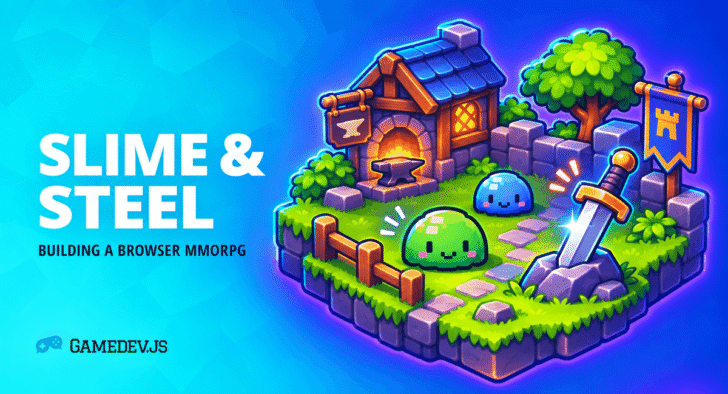
Slime & Steel: building a tiny MMORPG in the browser. Editorial illustration by Gamedev.js.
Guest article by Daniel, solo developer of Slime & Steel.
Editor’s introduction: Our recent SpringTale feature looked at a solo developer building a shared world with Phaser. Here, Daniel explains how he took Slime & Steel from an evening project to a live browser MMORPG, with code-generated art, streamed terrain and one client for phones, keyboards and gamepads.
I always wanted to run my own MMORPG. Not play one, run one: the world, the server, the people in it. So for the last twelve months I built one in the evenings next to my job. The first commit is from 16 November 2025, and on 15 November 2026 Slime & Steel had its official launch.
It is a tiny MMORPG that runs in the browser: phone, PC or controller, free, no download, no account needed to start. You fight in turn-based battles with parry timing, hatch slime pets from eggs, smith your own gear, bid on houses in the village and, since launch week, found guilds. On a normal day a few dozen people play, and some of them stay up until five in the morning hunting bosses. That still surprises me every day.
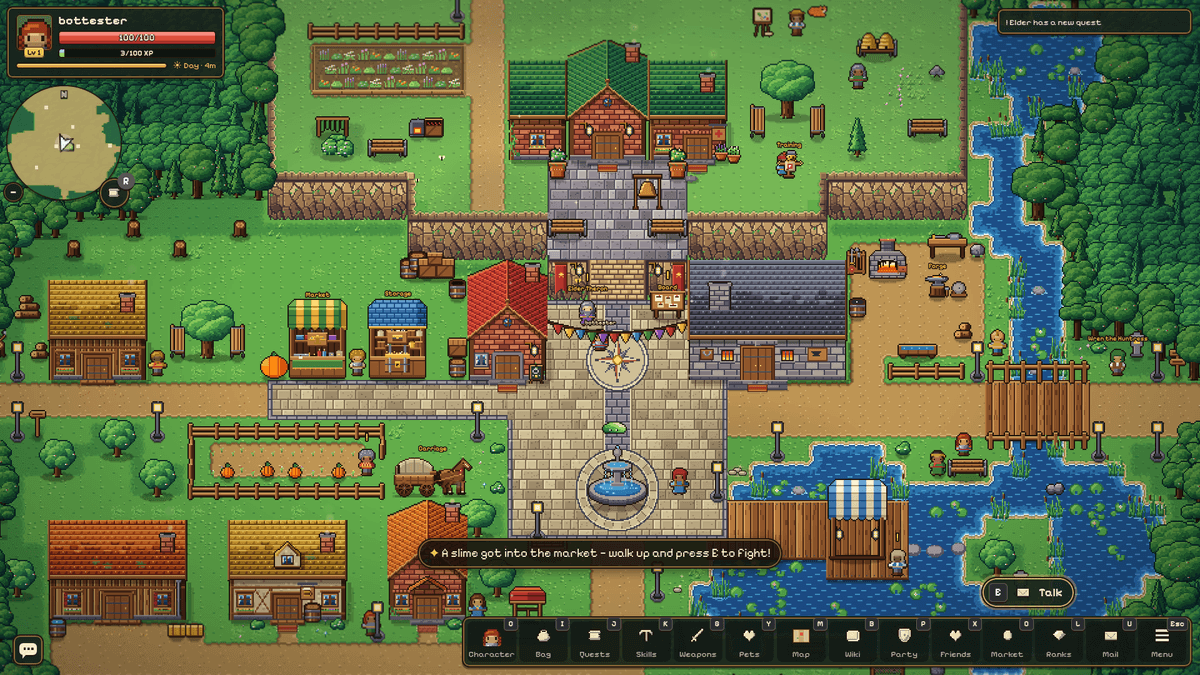
The stack in one line: a Node.js server in TypeScript (Express, Socket.IO, SQLite through better-sqlite3), a Phaser 3 client in plain JavaScript, and shared game rules in TypeScript that esbuild turns into browser bundles. It runs on one machine at my home.
One thing up front, because I think it matters: I build this alone, but with a lot of AI help. I write the code together with an AI coding assistant, and the music and the voices are AI generated. The world, the ideas and the decisions are mine, and so are the bugs. More on how that works in practice further down.
This article is about the technical side: how the pixel art is drawn in code, how the endless world is streamed in chunks, how the timing combat works on a phone, how one client serves touch, keyboard and gamepad, and how I host it all myself without kicking players out on every update.
Pixel art drawn in code
Every pixel in the game comes out of a JavaScript function. There are no hand-painted sprite sheets and no image generator: trees, houses, monsters, icons and even the favicon are drawn by small generator scripts that write PNG atlases.
The reason was practical. I started with a bought asset pack, and its license does not allow the art to be used as AI input. My AI assistant could therefore never look at the game it was helping me build. Once the art came from code, it could render a sprite, look at it, and change the code that drew it. Since 1 October 2026 the game shows only its own art.
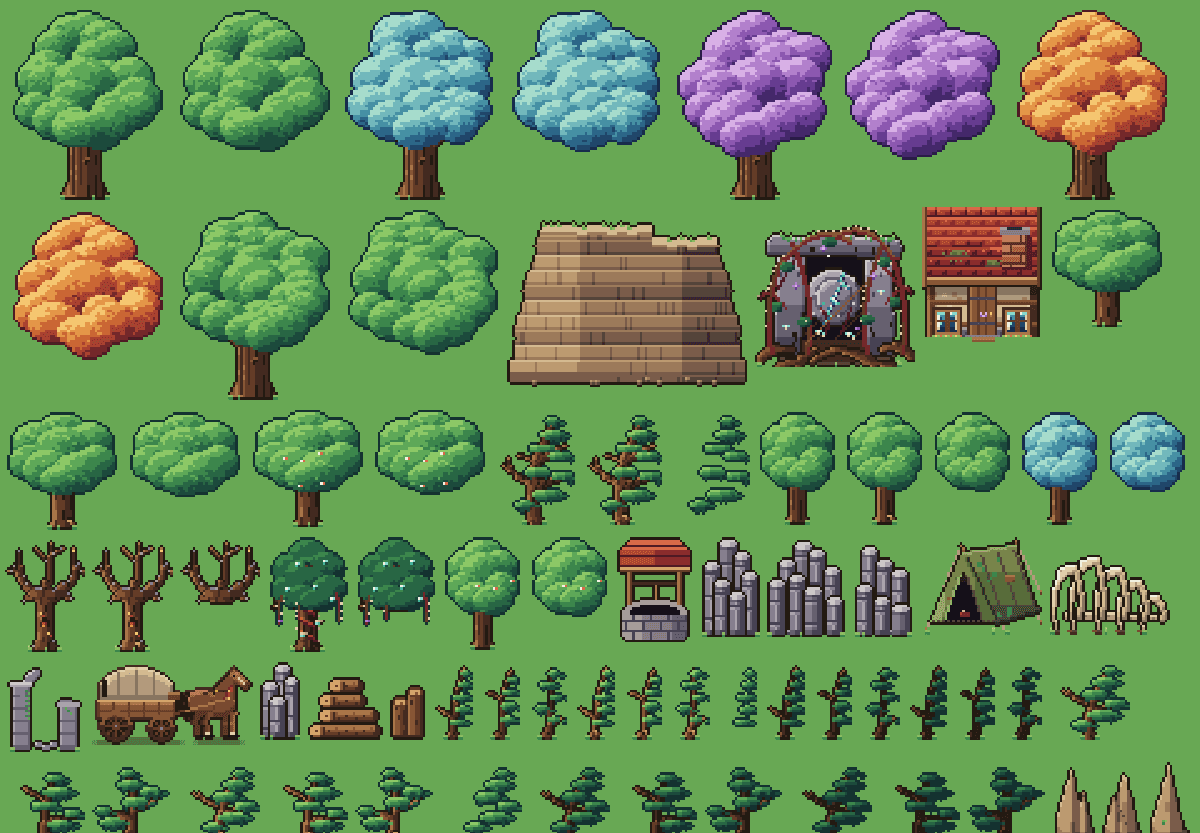
The core is one small drawing module that runs both in Node (for baking) and in the browser. An image is just a grid of colours. On top of that sits a short style guide, written down as rules instead of taste:
- One pixel grid and one fixed scale for everything. No odd scaling, ever.
- One palette of colour ramps from dark to light. A new colour means a new ramp, never a loose hex value in a sprite.
- One light direction for the whole world.
- Fixed random seeds, so every bake produces the same image.
Here is the actual function that shades the slimes, simplified a little. It is a lit ellipse with five tones:
// Ball with light from the top left; ramp = 5 tones, dark to light
function ball(s, cx, cy, rx, ry, ramp, flatBottom = false) {
  for (let y = Math.floor(cy - ry); y <= cy + ry; y++)
    for (let x = Math.floor(cx - rx); x <= cx + rx; x++) {
      const nx = (x + 0.5 - cx) / rx, ny = (y + 0.5 - cy) / ry;
      if (nx * nx + ny * ny > 1 || (flatBottom && ny > 0.55)) continue;
      const v = -(nx * 0.6 + ny * 0.8); // how much it faces the light
      set(s, x, y, ramp[v > 0.6 ? 4 : v > 0.2 ? 3 : v > -0.3 ? 2 : v > -0.65 ? 1 : 0]);
    }
}
A slime is that ball, a white glint, two eyes and an outline. Its idle animation is four frames where the shape itself is redrawn squashed and stretched, not moved. The death animation squashes it further and lets it dissolve with a hashed hole pattern. Colour variants are just different ramps, so a red or a blue slime costs one line.
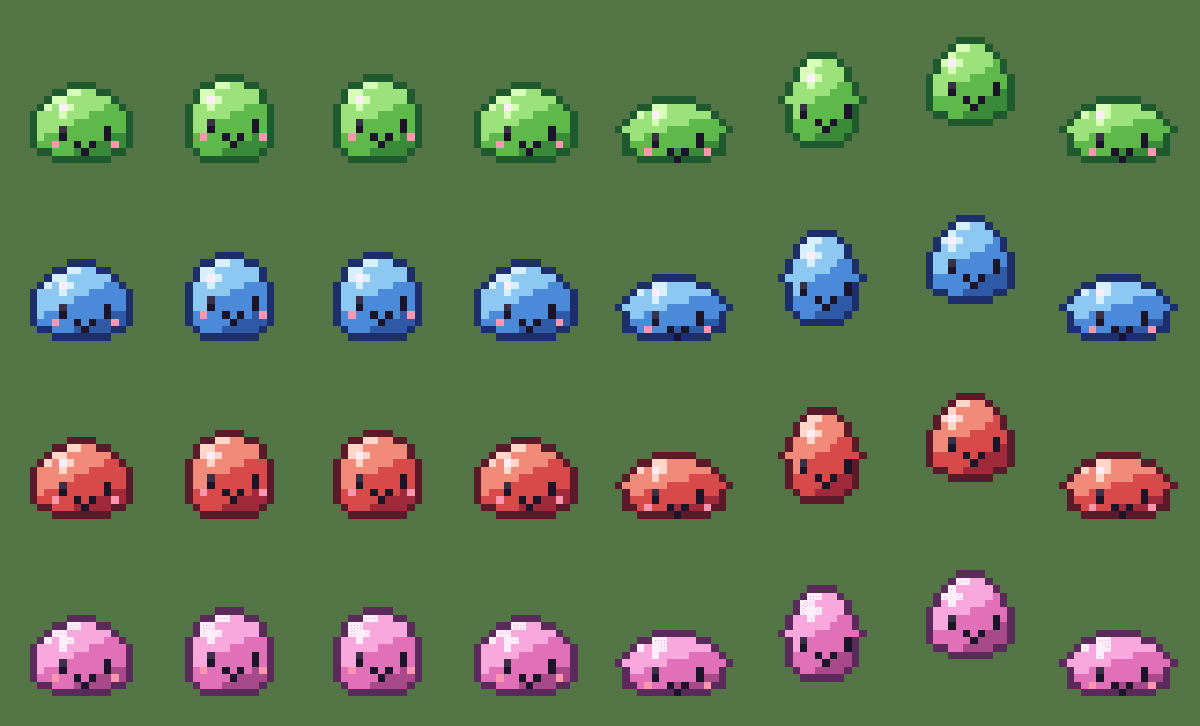
A single command runs all generators and writes the atlases. A test fails if the checked-in atlases are older than the generator code, so nobody (me included) can forget to bake. Player characters are the exception: there are too many combinations to bake them all, so the client assembles each character from parts at runtime.
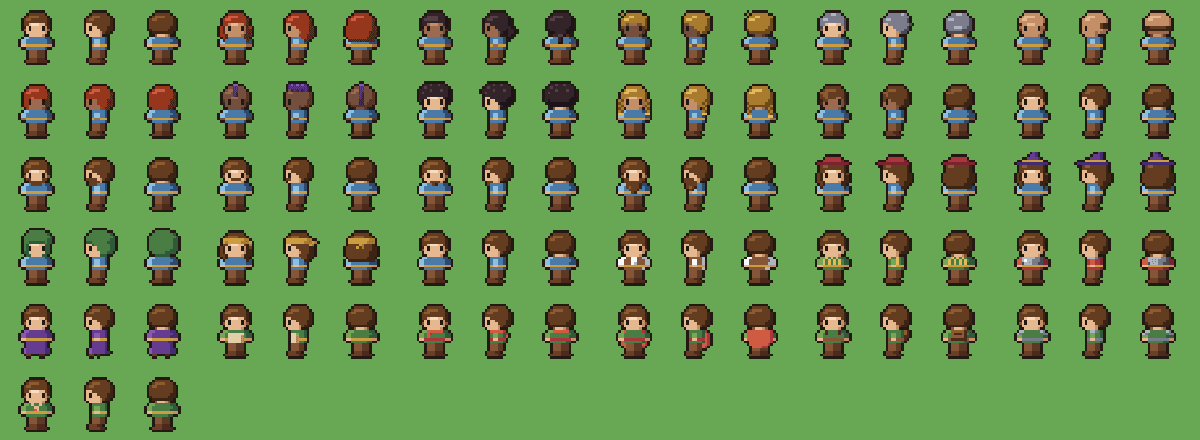
What I learned: drawing in code is slower for the first sprite and much faster for the fiftieth. Changing the light direction or a palette ramp updates the whole world in one bake. And it forces you to write your style down as rules, which turned out to be the best thing that happened to the look of the game.
An endless world in chunks
The world has no edge. It is cut into chunks of 40 × 30 tiles, and the server generates each chunk the first time someone comes near, then stores it in SQLite. Every player sees the 3 × 3 chunks around them.
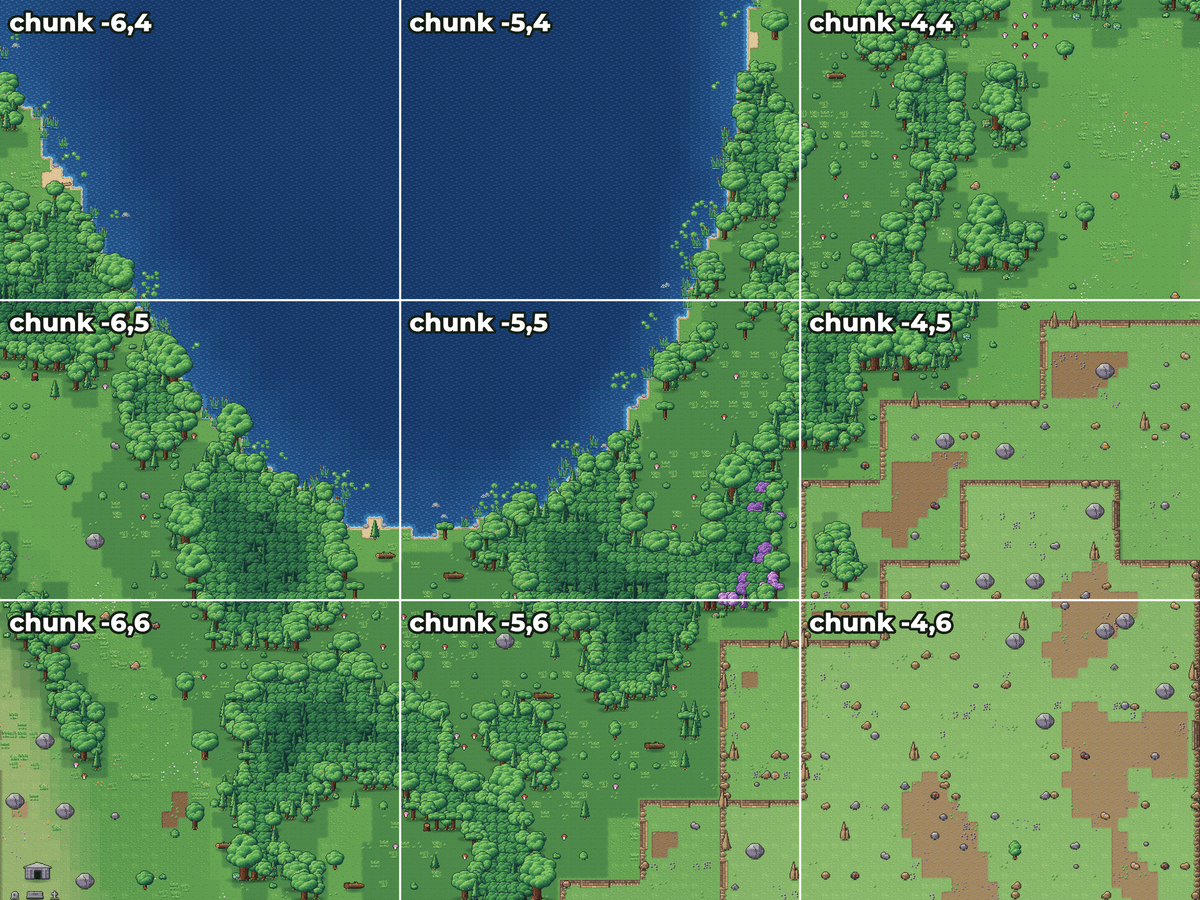
The rule that keeps this sane: every tile is a pure function of the world seed and its world coordinates. Terrain, forest, water, paths, height, even which flower grows where. A tile on a chunk border comes out the same no matter which neighbour was generated first, so there are no seams. The same rule applies to monsters: their level depends only on the distance from the starting village, and the village itself stays peaceful.
Three lessons from the world generator that cost me the most time:
1. Snap the height levels to a coarse grid. The world has three height levels with cliffs and stairs between them. My first version followed the noise contour tile by tile. The cliff edges fell apart into tiny steps, and since every short edge got a staircase, almost the whole cliff became walkable: I counted 91 staircases on 41 wall tiles. Snapping the levels to coarse blocks and removing lonely blocks fixed it, and the plateaus suddenly looked built instead of frayed.
2. Test reachability, not rules. At first, stairs only appeared on the south side of plateaus. Every edge passed its own check. But plateaus that sloped down to the north were closed all around, and only 42% of the highlands could actually be reached. Checking each edge did not find that. What found it is a flood-fill test: start in the valley, walk over everything walkable, and fail for every plateau that was never reached. It runs over six seeds and 10 × 10 chunks each. The same kind of test later found 70 forest clearings that nobody could enter, the biggest one 266 tiles, with monsters and ore inside. Now an enclosed clearing simply grows into forest.
3. A chunk only writes its own tiles. A cliff wall hangs below a plateau. If the plateau draws its own wall downwards, the wall is missing exactly where the tile below belongs to another chunk. So the lower tile asks “is there a plateau above me?” instead. Big tree crowns that reach over a chunk edge are sent along as flat “ghost” pieces, so the neighbouring chunk draws the other half.
The networking side had its own lesson. I first sent one update packet per chunk. But the client treats each packet as the full list of enemies it can see, so a player standing near the corner of nine chunks saw enemies blink in and out. Now every player gets one packet of their own, 20 times a second. Socket.IO rooms per chunk are still used for events that only matter nearby, like someone chopping a tree.
And one lesson from running it live: stored chunks don't change when the generator does. When the village grew a new guild square after launch, the live world still had the old forest standing on it. Any change to the generator now comes with a small script that resets exactly the chunks it touches.
Editor’s note: Our look at terrain in Zero-G follows another persistent world where the ground must stay consistent when players return. The browser replay walkthrough explores how repeatable starting conditions and inputs can reproduce an experience.
Turn-based combat with timing rings
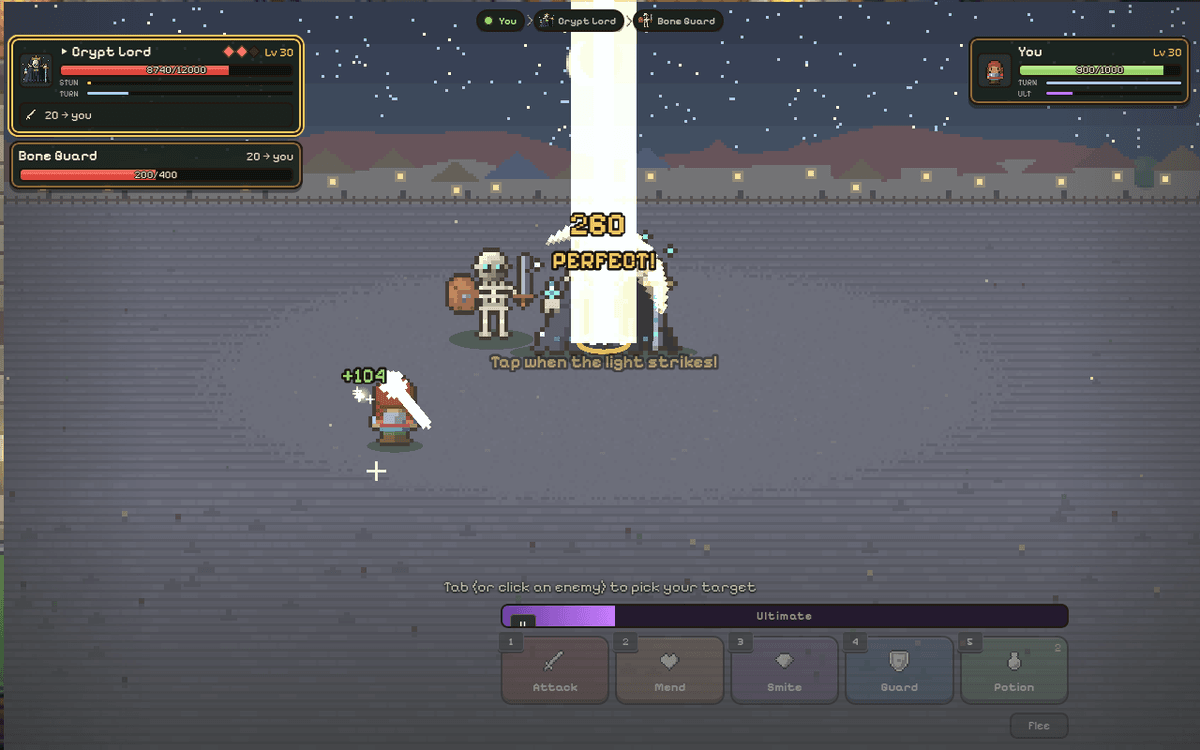
Fights are turn-based, but your timing decides how well a turn goes. I wanted the feeling of Paper Mario or Sea of Stars in a browser game that also works on a phone over mobile data.
Each fighter has a turn bar that fills over time. Up to four players can be in one fight; you join by tapping a monster someone else is already fighting. Enemies announce their next move with its damage and target, so you can plan.
- Attacking: a ring closes around the target. Tap when it hits the gold zone for a stronger hit.
- Defending: when an enemy winds up, a ring shrinks around your character. Tap close to the impact to block, tap almost exactly on it to parry and counter.
- Skills each get their own small input, like hold-and-release or taps in rhythm, so they feel different from a normal attack.
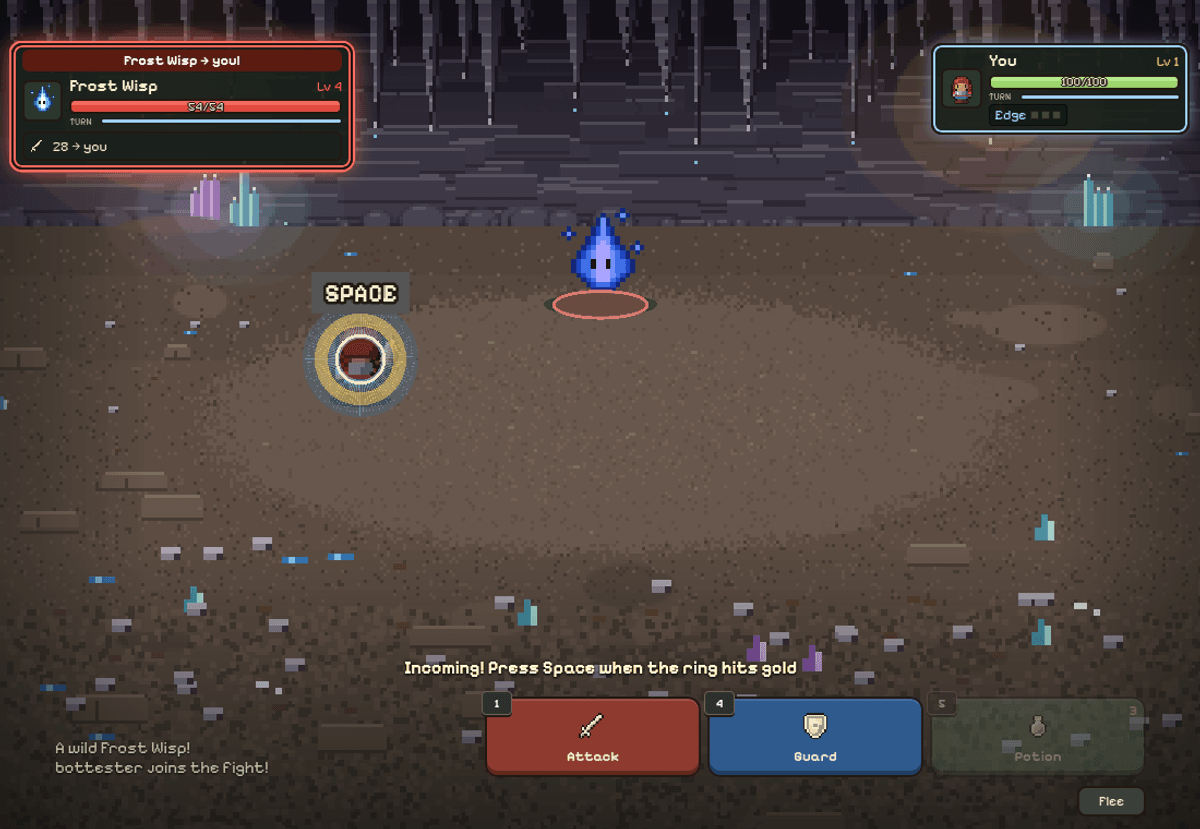
Latency. A parry window is shorter than a typical mobile ping, so judging a tap by when its packet arrives at the server would make parrying impossible on a phone. The fix is to judge the tap against what the player actually saw on their screen, while the server still decides what counts. Lag then shifts the picture and the measurement by the same amount, so it stays fair. The battle logic itself is a plain class on the server with no idea about sockets, which makes it easy to test.
Timing is a bonus, never a requirement. You can win normal fights without hitting a single ring. That came from watching real new players. Out of 19 newcomers I followed, 13 reached their first fight and only 5 their first quest. A level 1 player saw six buttons, an ultimate and six unlabelled bars. Now new players start with three buttons, new moves unlock with levels and explain themselves on the device you use, and enemies give beginners more time to think. In the simulation, a slow bot that rarely hits a ring went from winning less than half of its fights against an equal enemy to almost nine in ten.
Tune for phones, not for bots. That simulation script plays hundreds of fights per run. My first bot answered instantly, so every fight looked fair on paper and felt too hard in the hand. The bot now allows about 0.8 seconds for a reaction, plus around 150 ms of lag, to better approximate play on a phone. At the other end, a few players parry nearly everything, so every boss also has a heroic mode for them.
One client for phone, PC and controller
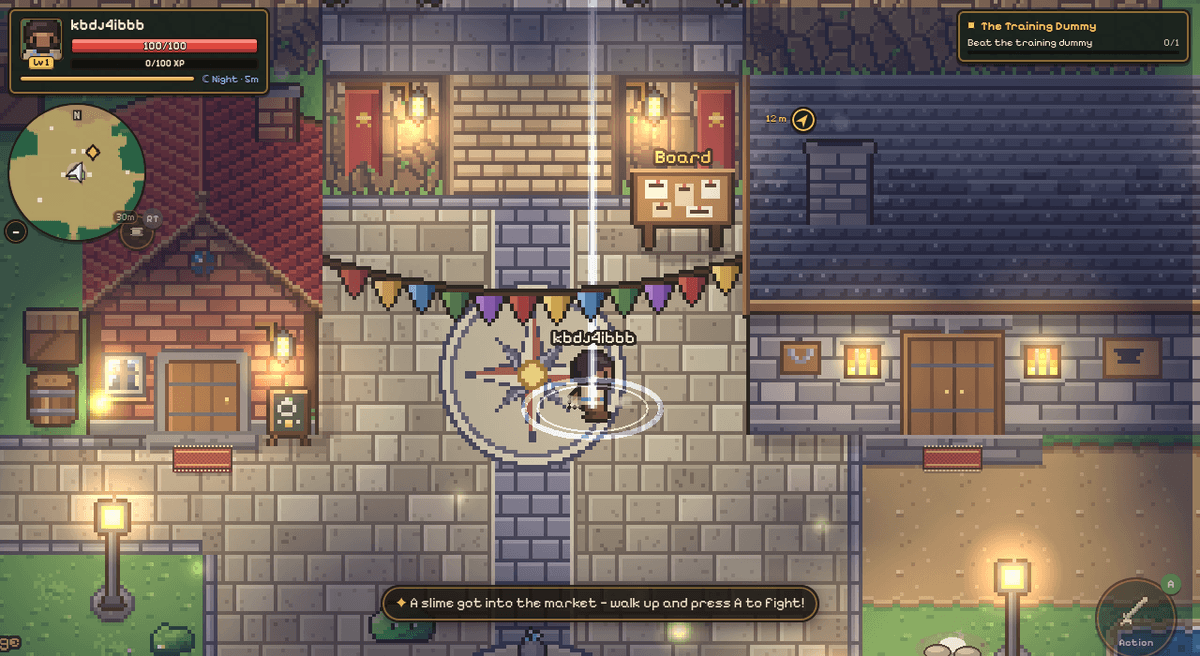
There is exactly one client. The same page runs on a small Android phone, a 4K monitor and a handheld PC with a gamepad. The rule I set early: every action must work with touch, keyboard and controller. Menus, fights, crafting, chat, all of it.
Scaling. The HUD is laid out in fixed pixels for a 1920 × 1080 reference and zoomed as a whole for the actual screen, with a “UI size” setting for people on handhelds. The game camera is a different story. At zoom values like 1.25, pixel art shimmers on every step (I called it “crawling”). So the camera zoom snaps to whole numbers and 1.5, and the HUD zoom stays free.
Controllers. One gamepad layer runs from the login screen on: in windows it moves a focus frame, in fights it maps the buttons to the actions, in the world it walks. Two things I would tell my past self:
- No
confirm()oralert()for players, ever. A gamepad cannot press the buttons of a browser dialog. - Listen to every connected pad and follow the one that is actually being pressed. A player’s headset showed up as the first “gamepad” with a stuck axis, and their real controller was ignored until they unplugged things.
Editor’s note: The Bomber Bunnies controls article offers another practical example of mapping keyboards, gamepads and bots onto a common set of actions.
Automated checks. I can’t look at every window on every device after every change, so a headless browser does it for me. One script opens every window at seven screen sizes, from a small phone to 1080p and a handheld at 150%, and fails if a close button can’t be reached, text is cut off, buttons are clipped or tap targets are too small. Another one plays through a matrix of actions × input devices with a simulated gamepad. If either fails, I don’t deploy.
Phaser lessons that each cost me days:
- One exception inside
update()and the game loop is gone. No error screen, the world just stops. Everything optional in the HUD now runs through a small try/catch wrapper. - A paused scene still receives network packets. The world scene pauses during a fight while position updates keep coming 20 times a second. I started a tween per packet; paused tweens don’t run, they pile up. After a 20-second fight there were up to 49,000 of them, and they all started at once when the fight ended. Now positions are set directly while paused, and there is at most one movement tween per entity.
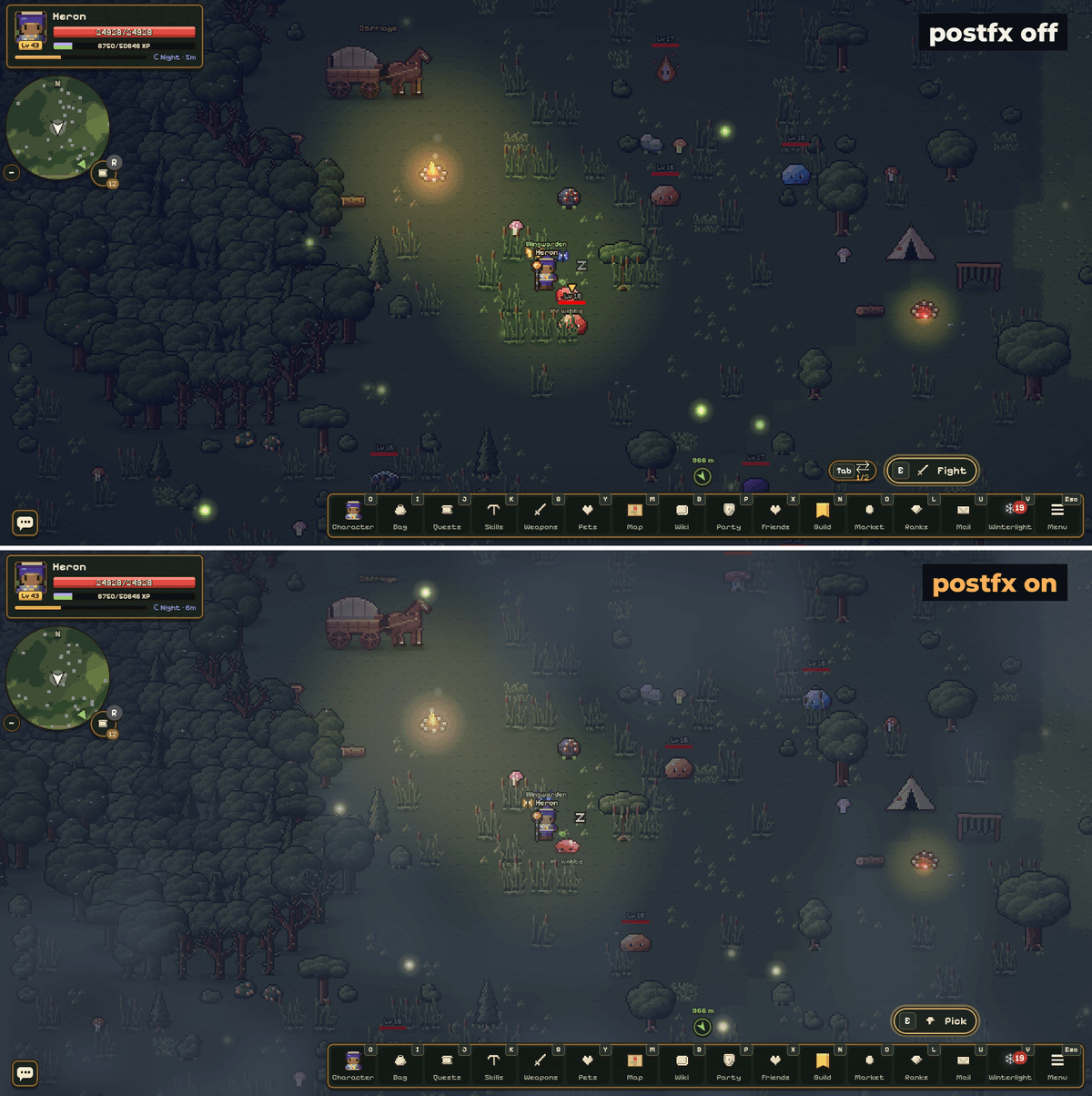
- The world has a light post-processing pass (colour grade per region and time of day, a little tilt-shift blur). Weak phones can’t afford it, but a fixed fps threshold doesn’t work either: an iPhone in low power mode can be capped at 30 fps. So the game switches the effect off for a few seconds when it gets slow and only keeps it off if the game gets clearly faster without it.
Editor’s note: Our Songs of Hyrule feature also looks at input, feedback and interface details that help a browser game feel complete.
Hosting it myself
The whole game runs on my own hardware at home: one Node process, a few SQLite files, nightly backups plus one before every deploy. No cloud bill and no platform between me and the players. Running the infrastructure myself was part of the dream, and for a game of this size one machine is plenty.
The hard part was not the server. It was updating it without making players angry.
Lesson one: players hate restarts. On one day in October I deployed more than eight times. Every deploy restarted the server and kicked everyone out, and players asked, politely but clearly, for updates only between 2 and 3 at night. So now changes are committed during the day and go live in one bundled update at night. Players get a 30-second warning in the chat before a restart, and the server saves everything first.
Lesson two: a dropped connection is not a reload. On phones the connection drops all the time, for example when you switch to another app for a moment. The server now keeps your character parked in the world for a few minutes, and the client quietly reconnects and catches up instead of reloading the page. A short restart at night feels the same: a small “Reconnecting…” pill, and you are back where you were.
Lesson three: cache forever, but by content. Every static file is served with a hash of its content in the URL and cached for a year. After an update, open pages only reload if the client code really changed. A new image or a server-only fix doesn’t touch anyone’s session.
Lesson four: not everything needs a restart. The village notice board in the game shows news, polls and wanted posters. Those are plain data files, and the server reloads them on a signal without restarting. So I can post news in the middle of the day while people are playing, and the only thing they notice is a new note on the board.
How I work: AI help, and my own hardware
I said it at the start and I want to be precise about it, because “made with AI” can mean very different things.
Code: written together with an AI assistant. I use Claude Code, an online coding assistant, every day. I decide what the game should be, how it should feel and what goes in, I play it on my phone and my PC, and I read what players report. The assistant writes most of the code, and we go back and forth until it is right. This is the one part that runs on someone else’s servers.
Music, voices and video: local, on my own GPU. Everything else that is AI generated runs on my own machine at home with an RTX 4090, using open-weight models. The music is made with an open music model, the voices in the trailers come from open text-to-speech models (the narrator is my own cloned voice), and the trailers are rendered in Blender on the same machine. No online generator, no uploads, nothing leaves my hardware. For me that is a real difference to typing a prompt into a web tool.
Art: no image model at all. As described above, the pixel art is drawn by code. The generator code is written with AI help too, but every pixel comes from a function, not from a diffusion model.
What makes this work is not the AI, it is the safety net around it:
- Over 3,500 automated tests. Every new piece of server logic gets a test that fails without the fix.
- Headless browser scripts that log in with a test account, walk around, fight and open windows, and fail on any console error. Phaser stops the game loop on an exception, so this matters more than unit tests.
- A fixed checklist before every release: type check, the full test suite, a browser smoke test, and the same smoke test against the live server right after the deploy.
- Players can send feedback from inside the game. Reports land in a small admin panel, and I mark each one done once its fix is live.
Working like this, a lot gets built in a short time, and that is exactly why the tests matter. Most of the bugs players found were not in code nobody tested. They were in situations nobody imagined, like a headset that pretends to be a gamepad.
Money: never pay-to-win
If Slime & Steel ever makes money, it will be through cosmetics only. Real money will never buy an advantage: no stronger gear, no faster levels, no skipping the grind that other players do by hand.
The idea I like most is physical: small 3D-printed merch with a QR code on it that unlocks a cosmetic in the game. Something you can put on your desk that also shows up on your character. In a game where players bid real effort on a house in the village, anything that can be bought with a credit card has to stay pure decoration.
It also keeps the design honest. When nothing can be sold, the only way to make a player stay is to make the game better.
What a year taught me
If I had to give one piece of advice from this year, it would be: test what the player experiences, not what the code promises. Every edge passed its check while half the highlands were unreachable. Every unit test was green while the game loop silently died on one phone. The flood fill and the headless browser found what the rules missed.
The second one: listen to the people who play. The best changes in this game came from watching newcomers get lost in the first five minutes, and from a player politely asking me to stop restarting the server in the middle of their evening.
Growing a game like this is slow. Someone wrote to me during launch week that it is like planting a seed: you don’t see it grow, but it is your little plant and you want it to thrive. That is exactly how it feels, and I enjoy every bit of it. Guilds arrived during launch week, and the next update is already in the works.
If you want to see it for yourself, you can play Slime & Steel in your browser on your phone or PC, with no account needed to start.
Daniel, solo developer of Slime & Steel.

HTML5 Game Developer, Enclave Games indie studio founder, js13kGames competition creator and Gamedev.js Weekly newsletter publisher. Mozilla Tech Speaker, Gamedev.js community firestarter. Organizes meetups / workshops / hackathons in Poland, passionate about new, Open Web technologies, excited about WebXR and PWAs. Likes eating sushi and playing Neuroshima Hex.