Make a chiptune soundtrack for your jam game with ZzFX Studio
A title-screen tune only gets a few seconds to introduce a game. For a small browser project, that makes a short loop a good place to start making music. Justin Walsh’s ZzFX Studio gives you four channels, a tracker you can open in a browser, and two very different ways to deliver the finished piece.
For this article we made a four-second example using the project’s generator. We chose the Title Screen preset, C major and 120 beats per minute, regenerated the bass in the first pattern, and played that pattern once. The experiment produced a complete JavaScript music bundle weighing 2,192 bytes zipped. The same score exported as a stereo WAV weighed 290,335 bytes zipped. Here’s what you can change before committing either version to a game.
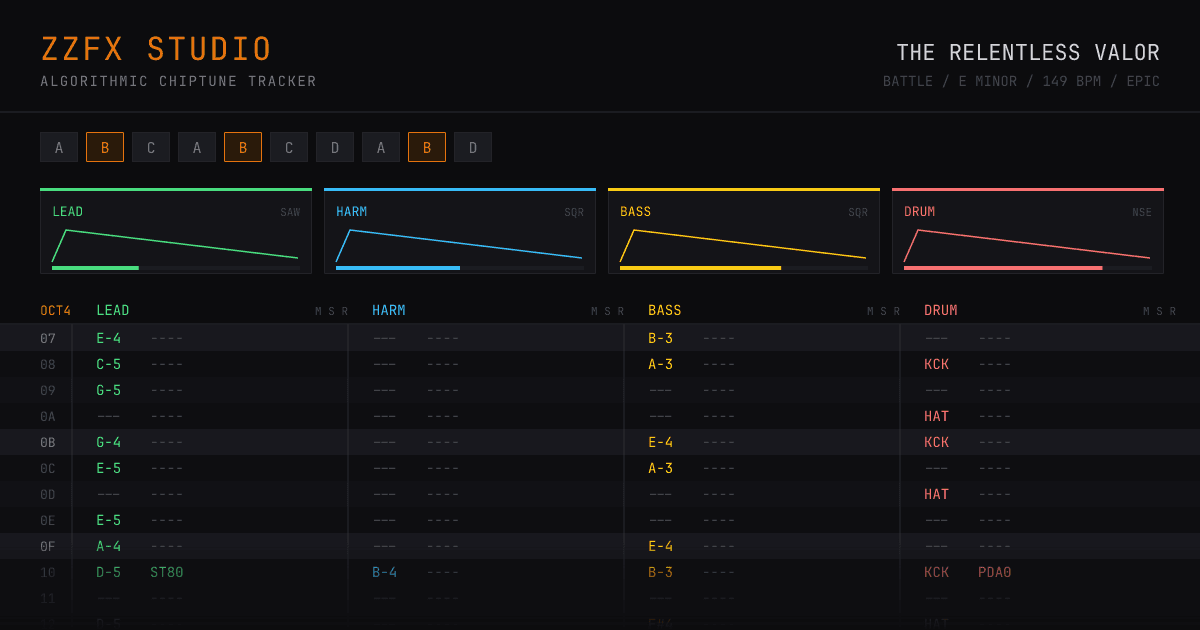
Find the tune inside one pattern
Start by generating a short song and listening to its first pattern. The four channels handle lead, harmony, bass and drums. Mute the lead for a moment. The bass and drums should give you a sense of where the beat falls even with the most recognisable part of the tune missing. Bring the lead back, then solo the harmony. Does it support the tune or compete with the sound you want to use for moving through a menu?
Keep the bits you like. If the first few notes sound right but the bass lands too heavily under them, regenerate that channel for the pattern and listen again. Saving a version before changing it makes the decision easier. Two minutes later, it can be surprisingly difficult to remember which combination made you stop clicking through the generator in the first place.
Try the tune against an actual interaction. Play it quietly underneath the title screen and move the selection between two buttons. Leave a little space in the melody if your selection sound keeps disappearing. The way sound and input answer one another was one of our favourite details to explore in Songs of Hyrule.
Weigh the player as well as the notes
We ran the Studio generator and exporter locally for the size comparison. The sequence used the first 32-row pattern, and the rendered result contained 176,384 stereo sample frames at 44,100 Hz. At 16 bits per sample, the WAV took 705,580 bytes before compression. A ZIP with that one WAV inside came to 290,335 bytes using DEFLATE at level nine.
For the JavaScript route, we used the Studio’s song-module export, bundled its imported micro player with it, and minified the result. That produced a 4,724-byte browser script. Zipped with the same settings, the complete file came to 2,192 bytes. Both numbers include the overhead of a one-file ZIP. The module gets much of its advantage from storing instructions for synthesising a repeating pattern. A recording has to represent what comes out of the speakers over the whole duration.
The choice changes where some of the work happens. The synthesised version has to build its sound buffers on the player’s device. Try starting it on the slowest phone you plan to support and check what happens to the menu animation. For a recording, measure the encoded audio format you actually intend to ship. The PCM comparison above gives you a reproducible baseline.
Make the second time around sound intentional
Listen across the join several times. A musical phrase can feel complete on its own and still produce an awkward accent when the first kick returns. Shorten a held final note, move a drum hit or let the last beat breathe. Then listen with the selection sound switched back on. That is the version your players will hear.
Give audio a deliberate start interaction, and keep the mute control available when the game returns to its title screen. Starting a second copy of a looping tune is an easy mistake to miss during a single playthrough. Try pausing, returning to the menu and starting again.
With Game Off heading into its final weekend, one finished loop is a reasonable evening’s work. And if the tiny export is the part that caught your attention, listen to a few of the js13kGames 2026 winners with the same question in mind. Which few notes would you miss if the sound were turned off?

HTML5 Game Developer, Enclave Games indie studio founder, js13kGames competition creator and Gamedev.js Weekly newsletter publisher. Mozilla Tech Speaker, Gamedev.js community firestarter. Organizes meetups / workshops / hackathons in Poland, passionate about new, Open Web technologies, excited about WebXR and PWAs. Likes eating sushi and playing Neuroshima Hex.